Guide
How to Track Expiry Dates by Scanning Barcodes
Can you find an expiry date from a barcode?
The barcode identifies the product. AI reads the printed expiry date. With the SimSim app, you can scan both using your phone’s camera.
Scan the barcode. SimSim identifies the product.
Scan the printed date or lot number. SimSim’s AI reads and enters it automatically.


Do barcodes contain the expiry date?
For most standard retail products, no. A standard barcode, such as the UPC or EAN on a package, only identifies the product's name and brand. It does not contain batch-specific information, which is why the expiry date is printed separately on the box or label and changes from batch to batch.
Note: Some specialized 2D barcodes can include expiry data, but standard retail barcodes usually do not.
The app uses the barcode to identify the product. Then you point the camera at the separately printed expiry date and SimSim’s AI reads and enters it automatically. You do not have to type the date manually; you only review it before saving.
Can an app read the expiration date for you?
Yes. Point your camera at the printed expiry date and SimSim’s AI reads and fills it in automatically—useful when you are adding many items at once. No typing is required, but you can review, edit, or manually enter a date whenever needed.
Step-by-step: tracking expiry dates by barcode
- Scan the barcode: Point your phone camera at the barcode, or use a handheld scanner. The app identifies the product instantly.
- Scan the printed expiry date: Point your camera at the date and let SimSim’s AI read and enter it automatically. Review the result, then add the quantity if you track it.
- Category and location are optional: If helpful, assign the item to a category, a specific location, or both—such as Aisle A, Fridge, Freezer, or Warehouse Zone—to make it easier to find later.
- Save: The app remembers the product. Next time you scan the same item, it will be recognized automatically.
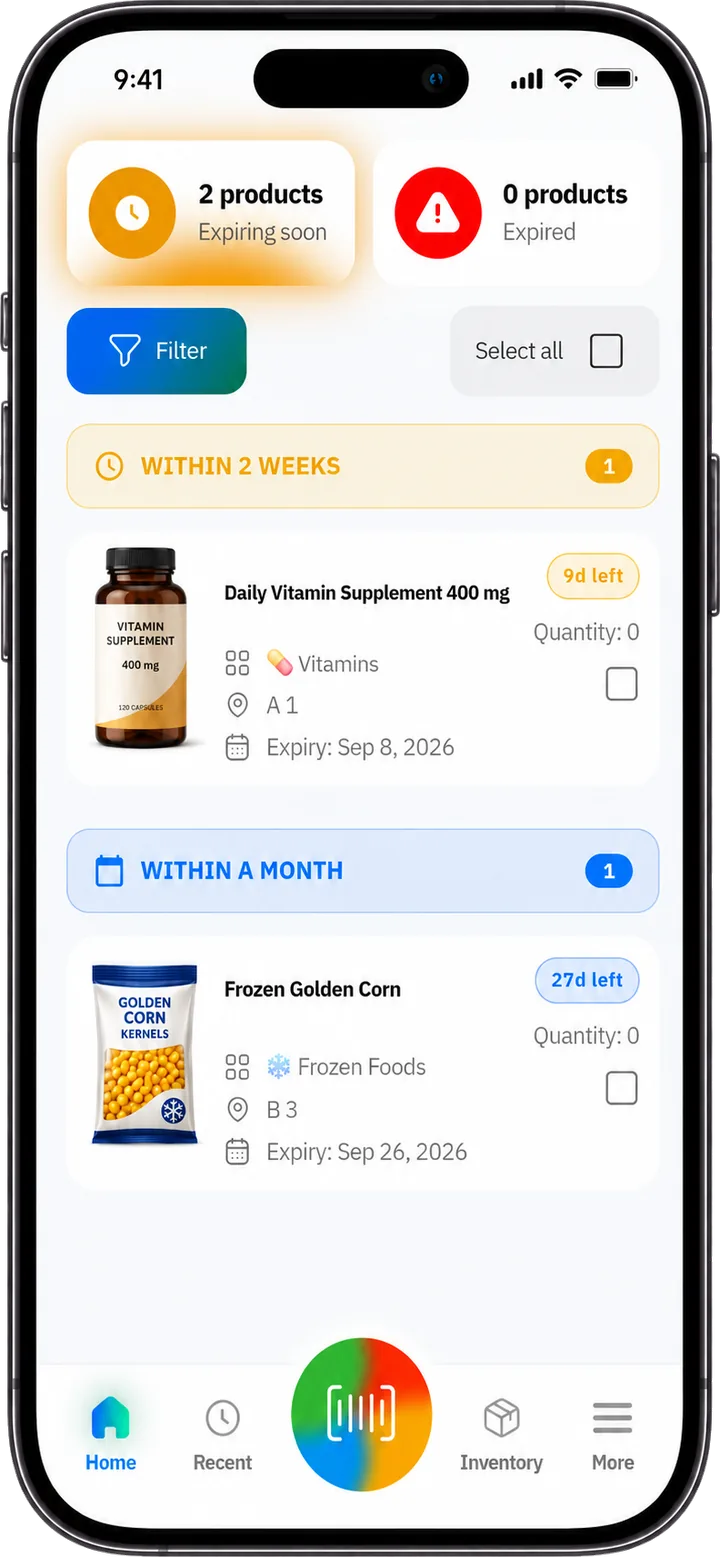
- Get alerts and act early: Choose how far in advance you want reminders, such as a week or a month. The app highlights what is expiring soonest, so your team can sell, discount, rotate, or donate items before they become a loss.
Phone camera or Bluetooth scanner?
Both work well. A phone camera is perfect for smaller shops or occasional scanning. A Bluetooth or USB handheld scanner is much faster when adding many products at once, such as in a warehouse or when receiving a large delivery.
Tips for accurate expiry tracking
- Scan products on arrival: Add products to the system as stock arrives so nothing slips through untracked.
- Allow enough time to act: Give yourself enough warning to act, such as 2–4 weeks for perishable food.
- Follow FEFO (First Expired, First Out): Move the soonest-to-expire items to the front and use or sell them first.
- Organize by location: Assigning each item to a storage location makes daily checks and stock rotation quicker.
Frequently asked questions
Can I scan with just my phone?
Yes. Your phone camera works as a scanner. A Bluetooth or USB scanner is optional and only needed for faster bulk entry.
Can I scan the expiration date instead of typing it?
Yes. SimSim’s AI reads the printed expiration date through your phone camera and enters it automatically, so manual typing is not required. You can still review or edit the result.
Who can benefit from barcode expiry tracking?
Grocery stores and other retailers, supplement shops, food banks, warehouses, pet supply stores, and even large households—anywhere products have expiry dates.
How to find an expiration date from a lot or batch number →
Complete guide to tracking expiration dates in inventory →
Track expiry dates the easy way
SimSim App is built to do exactly this: scan the barcode, scan the printed expiry date for automatic AI entry, and get smart alerts before products expire.