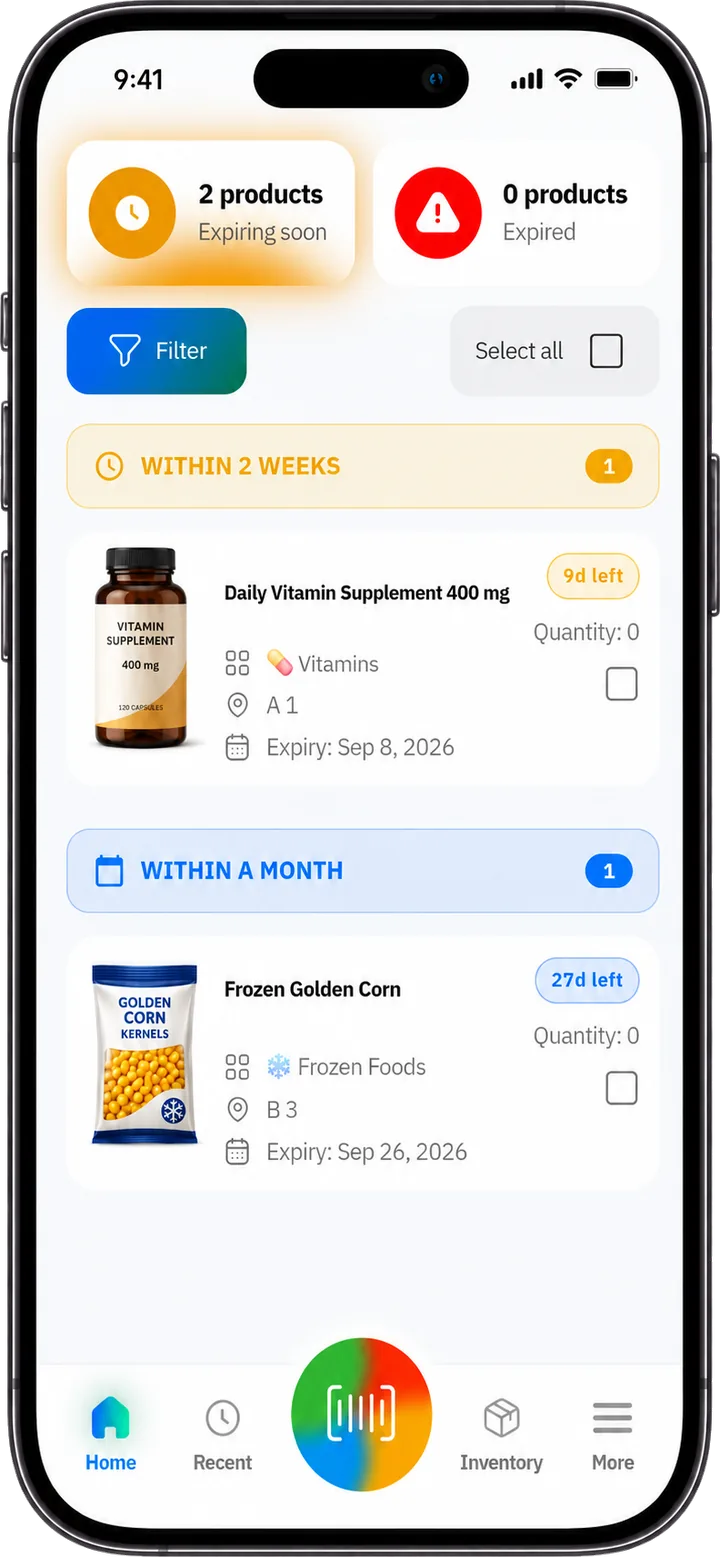
Expiry Tracking App

Product Expiry & Expiration Date Tracker App

Scan barcodes, track product expiry dates, and organize inventory in one simple place. Get smart alerts before products expire so your team can sell, rotate, discount, or donate items before they become losses.

Download on the App Store حمّله من App Store Descargar en App Store Get it on Google Play احصل عليه من Google Play Disponible en Google Play
500M+

Local and global product records

Speed

Fast product entry

Ease

Easy to use

Alerts

Before products expire

SimSim expiry date tracker app

A smarter alternative to paper notes and spreadsheets

SimSim tracks expiry dates accurately and alerts you before it is too late — everything you need to protect your products in one place.

With SimSim, you can:

  • 📦 Everything in one place — save product details, storage location, and smart alert schedules.
  • 🧠 Add the product once — SimSim remembers its details automatically to save you time next time.
  • ⚡ Instant barcode scanning — a large database with 500M+ product records means most products are recognized the moment you scan them.

Who needs a product expiry date tracker?

Any business or organization that stores products with expiry dates can benefit from a simpler way to track them.

Grocery stores and supermarkets

Find shelf items that are close to expiring and rotate stock before products become losses.

Convenience stores

Keep smaller teams organized without depending on manual checks alone.

Supplement shops

Track vitamins, protein, wellness products, and other items where expiry dates matter.

Food banks and charitable warehouses

Prioritize donations that should be used or distributed first.

Food warehouses

Use categories and locations to make large inventory easier to scan, find, and rotate.

Pet food and pet supply stores

Track pet food, treats, supplements, and care products so teams can rotate stock before items expire.

How expiry tracking works

A simple expiry tracking workflow helps teams scan, organize, rotate, and act before products expire.

Scan the product

Use the camera or a barcode scanner to add products quickly.

Add the expiry date

Choose the expiry date, quantity, category, and storage location.

Organize stock

Group items by shelf, fridge, storage room, or warehouse zone so everyone knows where products belong.

Keep your team synced

When products are added, updated, or removed, your team can stay aligned and work from the same inventory view.

Review priority items

See expired and soon-to-expire products in one priority view so daily work stays clear.

Get smart alerts

Receive alerts before products expire so your team can act early.

How to track expiry dates by scanning barcodes

Benefits of expiry date tracking

  • Reduce waste by selling, rotating, discounting, or donating products before they expire.
  • Avoid expired products sitting on shelves or in storage areas.
  • Save time and effort compared with manual spreadsheets and paper lists.
  • Know which products are closest to expiring so your team can organize inventory and act at the right time.

Frequently Asked Questions

Quick answers about expiry tracking, barcode scanning, alerts, and product organization.

What is an expiry date tracker app?
An expiry date tracker app helps you scan products, record expiration dates, and receive alerts before items expire — so you can reduce waste, stay organized, and manage inventory without relying on manual spreadsheets.
Who is SimSim designed for?
SimSim is designed for grocery stores, supermarkets, convenience stores, supplement shops, food warehouses, small businesses, and pet food and pet supply stores.
What is the best way to reduce expired inventory?
The best way to reduce expired inventory is to set early expiry alerts, review stock regularly, and rotate products before they expire. SimSim helps you act early by showing what needs attention first.
How does barcode expiry tracking work?
Open SimSim, scan a product barcode with your phone camera, and add the item to your inventory. You can also use a wired or Bluetooth barcode scanner for faster entry when managing many products.
Does SimSim automatically detect expiration dates when I scan a barcode?
SimSim can identify the product when you scan its barcode. For most products, expiration dates are printed separately on the package and are not included in standard retail barcodes. After scanning, simply enter the expiration date shown on the product once, and SimSim will track it, organize it, and send reminders before it expires.
Can I use a barcode scanner with an expiry tracking app?
Yes. SimSim supports phone camera scanning and external wired or Bluetooth barcode scanners, making it faster to add products in stores, stockrooms, or warehouses.
Can SimSim send alerts before products expire?
Yes. SimSim sends alerts before products expire, and you can choose when to be reminded — such as one month before, two weeks before, or a custom timeframe that fits your workflow.
Can my team use SimSim together?
Yes. SimSim is designed for teams. When products are added, updated, or removed, your team stays aligned from the same shared inventory view.
What devices does SimSim work on?
SimSim is designed to work on iPhone, iPad, Android phones, and Android tablets.
Can I try SimSim for free?
Yes. SimSim is free to start, so you can try expiry tracking before upgrading when you need more features.

SimSim is coming soon to iOS and Android.

Explore how SimSim helps teams track expiry dates, scan barcodes, organize inventory, and act early.

Download on the App Store حمّله من App Store Descargar en App Store Get it on Google Play احصل عليه من Google Play Disponible en Google Play